How to make Hamachi server to play C.S 1.6 online
In this short tutorial we will learn about how to play Counter strike 1.6 online by using Hamachi server...
This tutorial written by using Windows 7 but it should also work on windows Xp.
Step 1:
Download Hamachi software
here [Unmanaged version].
Step 2:
After Installing open Hamachi server and click on the POWER ON BUTTON to get started.
Step 3:
Create the Client with any name !!
Step 4:
Now click on Create a new network button.
Step 5:
Now you will get this screen
Make your Network with any name and password.
Step 6:
Now
without closing HAMACHI Go to the folder where you have installed Counter strike.
and then find
hlds file as
Open this file..
Step 7:
Now you get this screen
Fill the empty fields with your choices !!
Remember!! Only use 27016 ,28010 ,28011 ,27015 in UDP PORT field
If one PORT is not working try another UDP PORT.
Step 8:
Now you get this screen
Ignore this IP ADDRESS.
Step 9:
Now come to the Hamachi
without closing hlds and copy
Hamachi IP Address only asand attach with UDP PORT as
HAMCHI_IP:UDP
in my cas
e 25.196.116.119:27016 and copy this IP.Step 10:
Finally

open Counter strike and go to the
Find Server then
Favourite then
Add server.
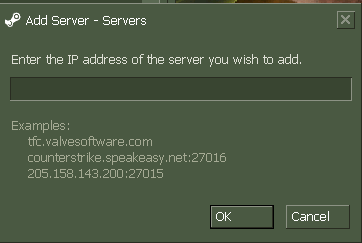
Step 11:
Now you get this screen
Just paste the whole IP.
paste this here 25.196.116.119:27016
Now click ok.
After loading you will enter the game alone.
You have done all work !!
NOW HOW TO ADD FRIENDS:First tell your friend to Download Hamachi then send him/her your
Hamachi network ID and
Password to join your Hamachi Network.
When he/she have joined your Hamachi network send him/her your complete IP as
25.196.116.119:27016.
and
tell her/him to follow Step 10 and Step 11. Now you both have done all work now you can play.
Cheers and share with your friends and also give us a like
!!
Still confused please comment below !!









 .
.